
Using Excel to manipulate Outlook required quite an extensive use of Visual Basic for Applications (VBA), as I have recently discovered. But once I got the hang of it, it was relatively easy to do the needful.
[29th March, 2022] First things first, you have to decide what kind of content you need to put inside the mail body. The best way that I have discovered is to make use of the “WordEditor” property of the “MailItem” item of the “Outlook.Application”. This is what I had done for a client of mine, of course I cannot share the code, but I can discuss the methodology of the same.
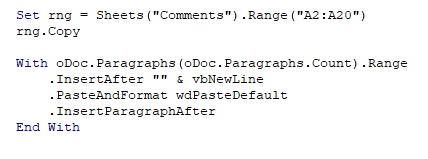
The first object of the excel application that is the easiest to handle is the range of cells in excel. The following code snippet (Code Snippet 1) demonstrates that adequately.
It is going to be tough, but somehow I will figure out the way in my next continuing post of this same one.
(This is a work in progress post, so keep reading and following my posts !!)
 CA Vikram S. Mathur (excel-vba-ahmfca.in)